Getting Slack Notifications From Kafka Events
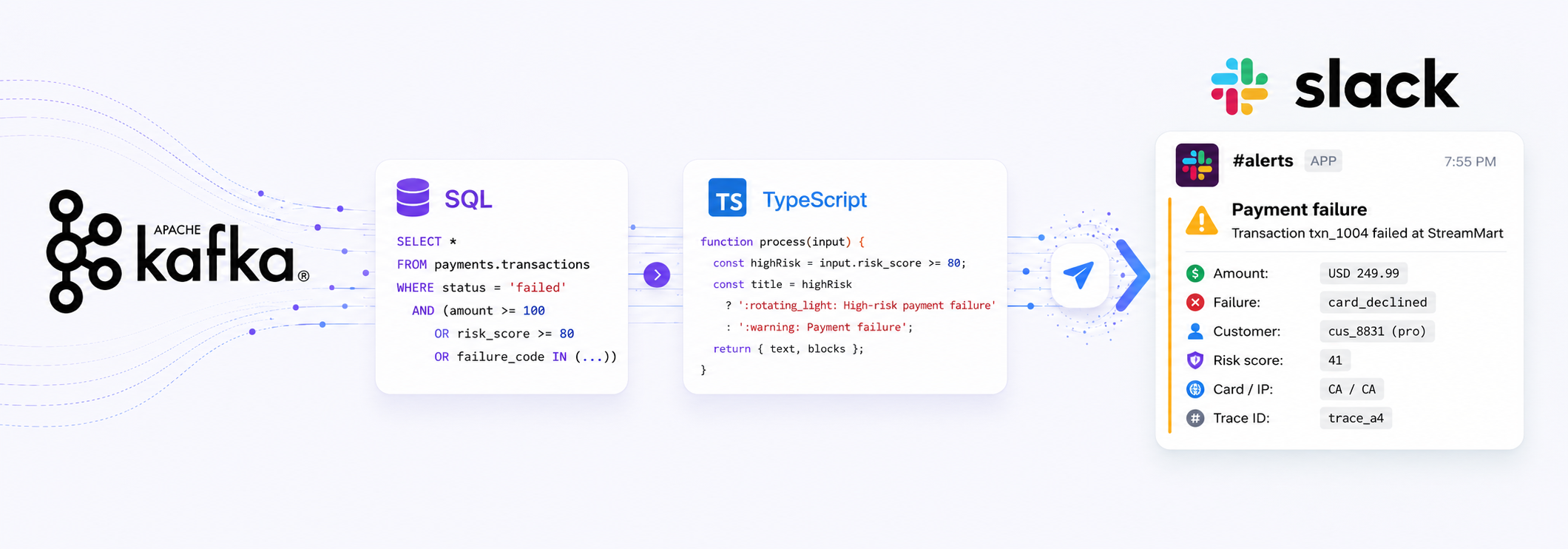
Streamling lets you describe a streaming pipeline as a single YAML file: sources read data, transforms reshape it, and sinks write it out. This guide walks through configuring and deploying a Streamling pipeline that sends you Slack notifications in case of important events consumed from Apache Kafka.
Install Streamling first if you haven't had a chance yet.
Problem
Imagine you work in an e-commerce company and one of your Apache Kafka topics contains events with payment transactions. Your Customer Success team would like to be notified in case of failed payments, especially in case of fraud.
As an engineer, you could build a new service that runs a Kafka consumer, filters data and submits webhooks. Or you can use Streamling and achieve the same result with less than 200 lines of YAML.
Consuming and Filtering Events
Create a file named pipeline.yaml. First, define a Kafka source for your events:
sources:
  payments.transactions:
    type: kafka
    topic: payments.transactions
    # can be avro or json
    # data_format: avro
By default, Streamling assumes that the data in the Kafka topic is serialized in the Avro format and uses a Schema Registry. You can configure access using environment variables, the full list of options is covered here.
Streamling also supports JSON format with a schema specified inline. You'll see an example of this in the final config file.
Now, we can filter the transactions we care about using a SQL transform:
transforms:
  failed_payment_alerts:
    type: sql
    primary_key: transaction_id
    sql: |
      SELECT *
      FROM payments.transactions
      WHERE status = 'failed'
        AND (
          amount >= 100
          OR risk_score >= 80
          OR failure_code IN ('suspected_fraud', 'card_declined')
        )
Our Kafka source is automatically registered as a table with payments.transactions name, so you can use standard ANSI SQL for data filtering.
At this time, you can add a simple print sink for debugging to see the filtered data:
sinks:
  debug:
    type: print
    from: failed_payment_alerts
Creating Slack Webhook Payloads
Slack offers a simple way to submit
webhooks by sending a small JSON payload to a configured HTTP endpoint. The payload can be as simple as {"text": "Hello, world."}, but
it's also possible to customize it with the Block Kit framework.
Block Kit allows you to define and group different types of blocks, primarily using Markdown. The format looks like this:
[
  {
    "type": "header",
    "text": {
      "type": "plain_text",
      "text": "New request"
      }
  },
  {
    "type": "section",
    "fields": [
      {
        "type": "mrkdwn",
        "text": "*Type:*\nPaid Time Off"
      },
      {
        "type": "mrkdwn",
        "text": "*Created by:*\n<example.com|Fred Enriquez>"
      }
    ]
  }
]
Creating complex JSON payloads in SQL is not a fun task. Thankfully, Streamling offers TypeScript transforms, so we can prepare payloads using a scripting language.
Here's the TypeScript transform we can use:
slack_messages:
type: script
from: failed_payment_alerts
language: typescript
primary_key: id
schema:
id: string
text: string
blocks: string
script: |
function process(input: any) {
function escapeMrkdwn(value: unknown): string {
return String(value ?? "")
.replace(/&/g, "&")
.replace(/</g, "<")
.replace(/>/g, ">");
}
function money(amount: number, currency: string): string {
return `${currency} ${amount.toFixed(2)}`;
}
const highRisk = input.risk_score >= 80;
const title = highRisk
? ":rotating_light: High-risk payment failure"
: ":warning: Payment failure";
return {
id: input.transaction_id,
text: `${title}: ${input.transaction_id} failed for ${money(input.amount, input.currency)}`,
blocks: JSON.stringify([
{
type: "section",
text: {
type: "mrkdwn",
text:
`*${title}*\n` +
`Transaction *${escapeMrkdwn(input.transaction_id)}* failed at ${escapeMrkdwn(input.merchant)}.`
}
},
{
type: "section",
fields: [
{
type: "mrkdwn",
text: `*Amount*\n${escapeMrkdwn(money(input.amount, input.currency))}`
},
{
type: "mrkdwn",
text: `*Failure*\n${escapeMrkdwn(input.failure_code)}`
},
{
type: "mrkdwn",
text: `*Customer*\n${escapeMrkdwn(input.customer_id)} (${escapeMrkdwn(input.customer_tier)})`
},
{
type: "mrkdwn",
text: `*Risk score*\n${input.risk_score}`
},
{
type: "mrkdwn",
text: `*Card / IP country*\n${escapeMrkdwn(input.card_country)} / ${escapeMrkdwn(input.ip_country)}`
},
{
type: "mrkdwn",
text: `*Trace ID*\n${escapeMrkdwn(input.trace_id)}`
}
]
},
{
type: "context",
elements: [
{
type: "mrkdwn",
text: `${escapeMrkdwn(input.failure_message)} | <${input.checkout_url}|Open checkout>`
}
]
}
])
};
}
As you can see, the transform is fairly advanced. We can define helper functions, pre-process data, apply simple formatting logic.
In the end, the transform returns a payload with three fields: id, text and blocks. id is required by Streamling
to be used as a primary key: these are needed by every source/transform/sink to maintain upsert semantics, if possible.
text and blocks are the fields that the Slack endpoint expects. Note: we used JSON.stringify on the blocks column
to pass a complex JSON structure as a string, and it's perfectly valid for the Slack endpoint!
Configuring and Sending Webhooks
Now we need to create a new Slack application and activate Incoming Webhooks. Each webhook is associated with a single Slack channel.
Once you have the webhook URL, you can create a webhook sink:
sinks:
   slack.failed_payment_alerts:
     type: webhook
     from: slack_messages
     url: "https://hooks.slack.com/services/<REST_OF_URL>"
     one_row_per_request: true
Putting Everything Together
The complete pipeline file is available for download here: slack-webhook-pipeline.yaml.
You can start a Kafka server locally and seed it with some data:
{"transaction_id":"txn_1001","event_time":"2026-07-01T17:40:00Z","status":"succeeded","failure_code":null,"failure_message":null,"amount":49.00,"currency":"USD","customer_id":"cus_1201","customer_tier":"free","merchant":"StreamMart","payment_method":"card","card_country":"US","ip_country":"US","risk_score":12,"checkout_url":"https://example.com/checkouts/chk_1001","trace_id":"trace_a1"}
{"transaction_id":"txn_1002","event_time":"2026-07-01T17:40:32Z","status":"failed","failure_code":"card_declined","failure_message":"The card was declined by the issuer","amount":89.00,"currency":"USD","customer_id":"cus_4410","customer_tier":"starter","merchant":"StreamMart","payment_method":"card","card_country":"US","ip_country":"US","risk_score":28,"checkout_url":"https://example.com/checkouts/chk_1002","trace_id":"trace_a2"}
{"transaction_id":"txn_1003","event_time":"2026-07-01T17:41:04Z","status":"failed","failure_code":"suspected_fraud","failure_message":"Payment blocked by fraud controls","amount":1299.00,"currency":"USD","customer_id":"cus_7712","customer_tier":"enterprise","merchant":"StreamMart","payment_method":"card","card_country":"GB","ip_country":"NG","risk_score":96,"checkout_url":"https://example.com/checkouts/chk_1003","trace_id":"trace_a3"}
{"transaction_id":"txn_1004","event_time":"2026-07-01T17:42:11Z","status":"failed","failure_code":"insufficient_funds","failure_message":"Card declined due to insufficient funds","amount":249.99,"currency":"USD","customer_id":"cus_8831","customer_tier":"pro","merchant":"StreamMart","payment_method":"card","card_country":"CA","ip_country":"CA","risk_score":41,"checkout_url":"https://example.com/checkouts/chk_1004","trace_id":"trace_a4"}
{"transaction_id":"txn_1005","event_time":"2026-07-01T17:43:20Z","status":"succeeded","failure_code":null,"failure_message":null,"amount":799.00,"currency":"USD","customer_id":"cus_9291","customer_tier":"enterprise","merchant":"StreamMart","payment_method":"card","card_country":"DE","ip_country":"DE","risk_score":19,"checkout_url":"https://example.com/checkouts/chk_1005","trace_id":"trace_a5"}
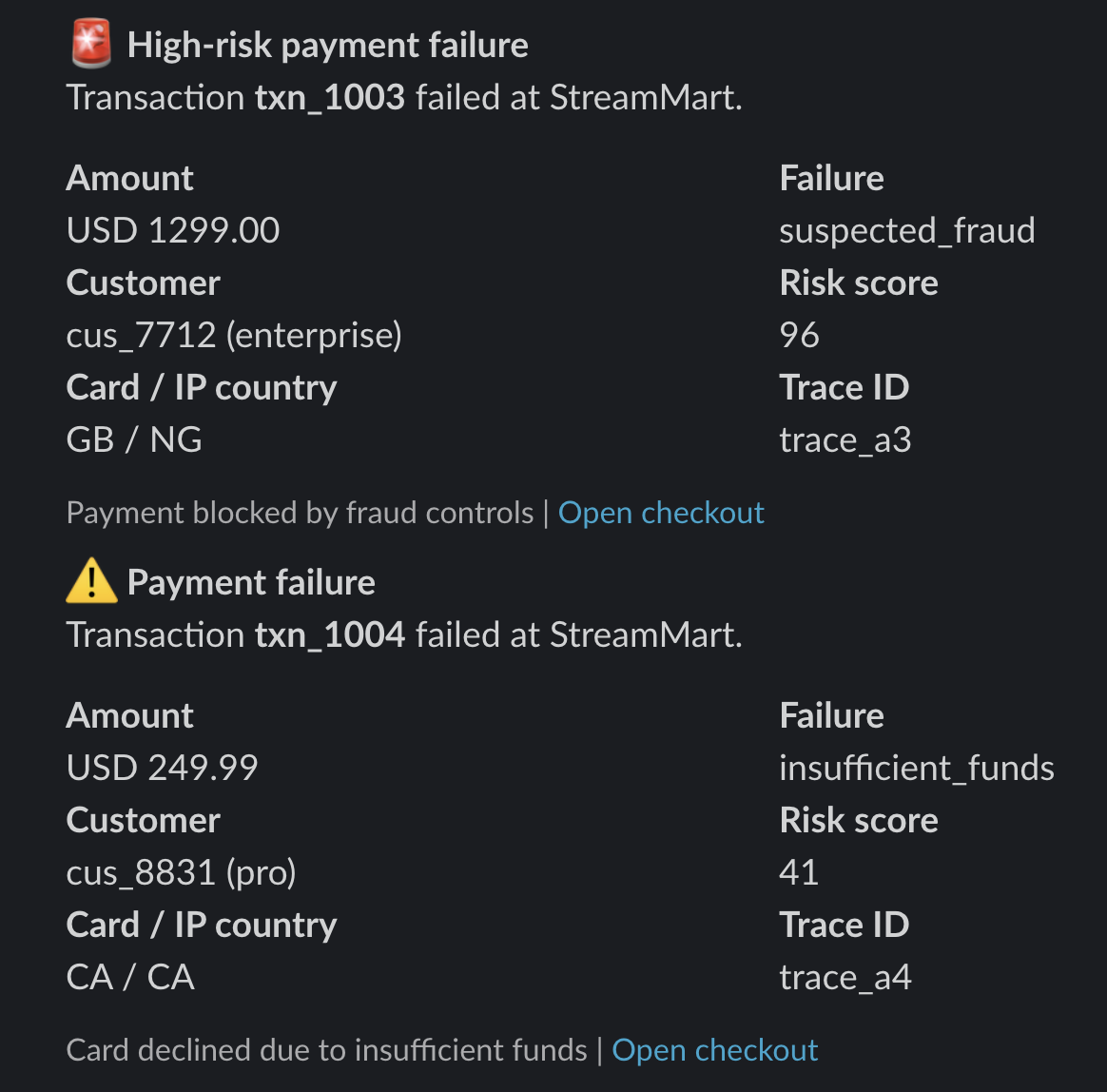
If you configure everything properly, you'll see payment failures in Slack: