Product Analytics With Postgres CDC and ClickHouse
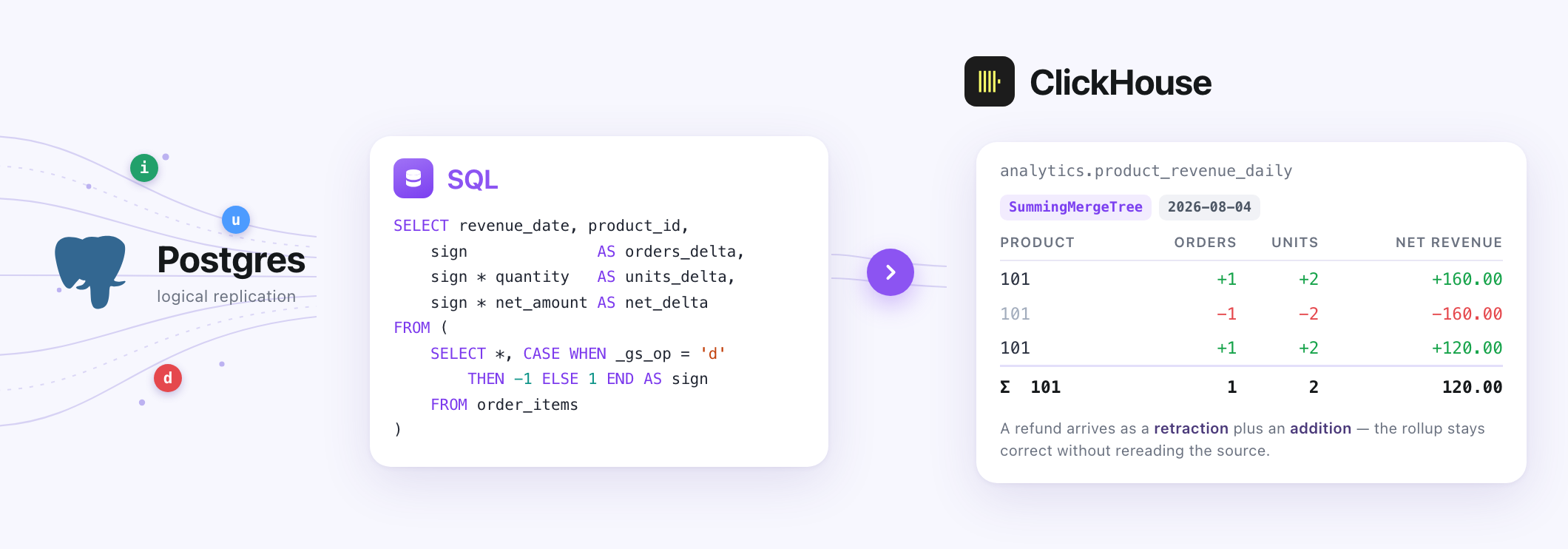
This tutorial walks through configuring and deploying a Streamling pipeline that ingests operational data from Postgres using Change Data Capture, and maintains a revenue rollup table in ClickHouse.
Install Streamling first if you haven't already, it's just a single binary.
Problem
Any successful e-commerce company eventually realizes the importance of analytics. It's very common to start by querying your operational database (e.g. Postgres). Soon you spin up a read replica to offload analytical queries. But eventually it becomes prohibitively expensive and unreliable.
So you start ingesting data either into a data warehouse (for internal analytics) or a fast OLAP database like ClickHouse, which is a perfect tool for powering user-facing product analytics. Your internal data warehouse doesn't need the data to be refreshed frequently, but users don't like seeing stale data. So you reach for a data streaming tool and Streamling can be a great fit for this!
We'll try to answer the following questions:
- What's our net and gross revenue?
- What are the top selling products?
- How many orders do we sell every day?
The Source Table
For simplicity reasons, we'll only ingest a single Order Items table, which has a granularity of one row per product within an order:
CREATE SCHEMA IF NOT EXISTS ecommerce;

CREATE TABLE ecommerce.order_items (
    order_item_id   BIGSERIAL PRIMARY KEY,

    order_id        BIGINT         NOT NULL,
    product_id      BIGINT         NOT NULL,
    product_name    TEXT           NOT NULL,

    quantity        INTEGER        NOT NULL,
    unit_price      NUMERIC(12, 2) NOT NULL,
    discount_amount NUMERIC(12, 2) NOT NULL DEFAULT 0,
    refund_amount   NUMERIC(12, 2) NOT NULL DEFAULT 0,

    currency        CHAR(3)        NOT NULL,
    status          TEXT           NOT NULL,
    ordered_at      TIMESTAMPTZ    NOT NULL
);
An order item moves through statuses over its life: pending, paid,
fulfilled, cancelled, partially_refunded, refunded. Only four of them
contribute to revenue:
paid
fulfilled
partially_refunded
refunded
pending and cancelled contribute nothing.
Note what the table does not store: gross and net revenue. Both are derivable, so the pipeline computes them and the source schema stays simple:
gross_revenue = quantity × unit_price
net_revenue   = gross_revenue - discount_amount - refund_amount
Why the Rollup Stores Deltas
The natural instinct is to have ClickHouse hold one row per product per day and update it in place. ClickHouse does not work that way - it is built for appends, not in-place edits.
So instead of storing totals, we store changes to totals, and let ClickHouse add
them up. A SummingMergeTree table collapses rows that share a sorting key by
summing the remaining columns:
CREATE DATABASE IF NOT EXISTS analytics;

CREATE TABLE analytics.product_revenue_daily
(
    revenue_date Date,
    product_id UInt64,
    currency FixedString(3),

    orders_delta Int64,
    units_delta Int64,

    gross_revenue_delta Decimal(18, 2),
    discount_delta Decimal(18, 2),
    refund_delta Decimal(18, 2),
    net_revenue_delta Decimal(18, 2)
)
ENGINE = SummingMergeTree(
    (
        orders_delta,
        units_delta,
        gross_revenue_delta,
        discount_delta,
        refund_delta,
        net_revenue_delta
    )
)
PARTITION BY toYYYYMM(revenue_date)
ORDER BY (
    revenue_date,
    product_id,
    currency
);
Every delta column can go negative, and that's intentional. Adding a state
means appending it with +1. Removing a state means appending the same numbers
with -1. An update is a removal followed by an addition, and the two cancel out
for everything that did not actually change.
Streaming Changes out of Postgres
The postgres_cdc_source plugin reads Postgres logical replication directly, without Kafka or Debezium.
It performs an initial copy of the table and then streams
every subsequent change. Grab the plugin from the
community plugins releases
and point Streamling at it:
export STREAMLING__PLUGIN__PATH=./libcommunity_plugins.so
Now define the source. Create a file named pipeline.yaml:
sources:
  ecommerce.order_items:
    type: postgres_cdc_source
    primary_key: order_item_id
    options:
      host: localhost
      port: "5432"
      database: shop
      username: postgres
      password: postgres
      table: ecommerce.order_items
      publication_name: streamling_order_items
      slot_name: streamling_order_items
      emit_update_before_row: "true"
      memory_backpressure_enabled: "false"
memory_backpressure_enabled: "false" is a local-development only flag (it's common
to use a lot of memory locally). Leave it enabled in production.
Each change arrives as one row: the table's own columns plus a _gs_op column
that says what happened - i for an insert (and for rows from the initial copy),
u for an update, d for a delete.
That is enough for a sink that upserts by primary key, but not for a rollup. When
an order item is refunded, the new image alone tells you what it contributes
now; it does not tell you what it used to contribute, which is what has to be
subtracted. emit_update_before_row: "true" fixes that: every update arrives as
two rows instead of one, a d carrying the old image followed by a u carrying
the new one.
Postgres only sends a complete old image if you ask for it, so the table needs:
ALTER TABLE ecommerce.order_items REPLICA IDENTITY FULL;
Turning Changes Into Deltas
Now every relevant change is a row that either adds a state or removes one. We can implement our transformation logic with a single SQL statement:
transforms:
  revenue_deltas:
    type: sql
    primary_key: revenue_date,product_id,currency
    sql: |
      SELECT
          CAST(ordered_at AS DATE)                       AS revenue_date,
          product_id,
          currency,

          sign                                           AS orders_delta,
          sign * quantity                                AS units_delta,

          CAST(sign * quantity * unit_price AS DECIMAL(18, 2))
              AS gross_revenue_delta,
          CAST(sign * discount_amount AS DECIMAL(18, 2))
              AS discount_delta,
          CAST(sign * refund_amount AS DECIMAL(18, 2))
              AS refund_delta,
          CAST(sign * (quantity * unit_price - discount_amount - refund_amount)
               AS DECIMAL(18, 2))
              AS net_revenue_delta,

          'i'                                            AS _gs_op
      FROM (
          SELECT
              ordered_at,
              product_id,
              currency,
              quantity,
              CAST(unit_price AS DECIMAL(18, 2))      AS unit_price,
              CAST(discount_amount AS DECIMAL(18, 2)) AS discount_amount,
              CAST(refund_amount AS DECIMAL(18, 2))   AS refund_amount,
              CASE WHEN _gs_op = 'd' THEN -1 ELSE 1 END AS sign
          FROM ecommerce.order_items
          WHERE status IN ('paid', 'fulfilled', 'partially_refunded', 'refunded')
      ) AS cdc
A few important details:
signis derived from_gs_op. Adrow - whether it came from a real delete or from the before-image of an update - becomes-1, and everything else becomes+1. Every metric is then multiplied by it.- Postgres
NUMERICarrives as a string. The CDC source maps types it cannot represent natively to strings, so the money columns need an explicitCAST(... AS DECIMAL(18, 2))before any arithmetic. - The status filter is applied to each image independently, inside the
subquery. This is what makes status transitions work without any special
handling. A
pending → paidupdate produces a before-image that fails the filter and an after-image that passes, so only the addition survives. Apaid → cancelledupdate does the reverse, leaving only the retraction. Neither case needs a rule of its own. - Every output row is an insert. The retraction is a negative row appended to
the table, not a ClickHouse delete, so
_gs_opis set to'i'on all of them.
Writing the Deltas
sinks:
  clickhouse.product_revenue_daily:
    type: clickhouse
    from: revenue_deltas
    table: product_revenue_daily
    primary_key: revenue_date,product_id,currency
    append_only_mode: false
    deduplicate: false
A few flags need a bit of explanation:
deduplicate: falsestops the sink from collapsing each batch to the latest row perprimary_key. Streamling is designed with upserts in mind, but we need to support retractions in this tutorial.append_only_mode: false: conceptually, our workload is append-only. However, in this case Streamling automatically adds a newis_deletedcolumn which we don't need. Setting this tofalsemeans any delete will be executed as an actual DELETE operation in ClickHouse, but all rows emitted by our SQL transform are explicitely marked as inserts, so it's not a concern.
Putting Everything Together
The complete pipeline file is available for download here: revenue-analytics-pipeline.yaml.
To try it locally, you need Postgres 14 or newer started with logical replication, as well as ClickHouse:
services:
  postgres:
    image: postgres:16
    ports: ["5432:5432"]
    command: ["postgres", "-cwal_level=logical"]
    environment:
      POSTGRES_USER: postgres
      POSTGRES_PASSWORD: postgres
      POSTGRES_DB: shop

  clickhouse:
    image: clickhouse/clickhouse-server:25.6.2
    # 8123 is HTTP, which the sink writes over. 9000 is the native protocol,
    # which the dashboard at the end of this guide needs.
    ports: ["8123:8123", "9000:9000"]
    environment:
      CLICKHOUSE_DB: analytics
Point the sink at the right ClickHouse database:
export STREAMLING__CLICKHOUSE_SINK__DATABASE=analytics
Create both Postgres and ClickHouse tables before starting the pipeline.
The ClickHouse one has to be created manually: the sink creates a missing table as a ReplacingMergeTree
by default.
Then seed three order items:
INSERT INTO ecommerce.order_items (
    order_id, product_id, product_name,
    quantity, unit_price, discount_amount, refund_amount,
    currency, status, ordered_at
)
VALUES
    (1001, 101, 'Wireless Keyboard', 2, 80.00, 10.00, 0.00, 'USD', 'paid',    '2026-08-04 16:00:00+00'),
    (1001, 102, 'Wireless Mouse',    1, 40.00,  0.00, 0.00, 'USD', 'paid',    '2026-08-04 16:00:00+00'),
    (1002, 101, 'Wireless Keyboard', 1, 80.00,  0.00, 0.00, 'USD', 'pending', '2026-08-04 17:00:00+00');
Start the pipeline with streamling pipeline.yaml. The initial copy produces two
rows - the pending item contributes nothing:
revenue_date  product_id  orders  units  gross   discount  refund  net
2026-08-04    101         1       2      160.00  10.00     0.00    150.00
2026-08-04    102         1       1       40.00   0.00     0.00     40.00
Watching It In Action
Now let's apply a few updates. A pending order gets paid:
UPDATE ecommerce.order_items SET status = 'paid' WHERE order_item_id = 3;
The before-image is pending and fails the status filter, so only the addition
lands:
orders_delta         = 1
units_delta          = 1
gross_revenue_delta  = 80.00
net_revenue_delta    = 80.00
Now a partial refund is recorded:
UPDATE ecommerce.order_items
SET refund_amount = 30.00, status = 'partially_refunded'
WHERE order_item_id = 1;
Both images pass the filter this time, so the pipeline emits two rows - a retraction of the old state and an addition of the new one:
orders_delta  units_delta  gross    discount  refund  net
-1            -2           -160.00  -10.00     0.00   -150.00
 1             2            160.00   10.00    30.00    120.00
Which sums to exactly what changed, and nothing else:
orders = 0, units = 0, gross = 0.00, discount = 0.00, refund = +30.00, net = -30.00
An order item is deleted:
DELETE FROM ecommerce.order_items WHERE order_item_id = 2;
One retraction, cancelling that item's original contribution.
A product is corrected:
UPDATE ecommerce.order_items SET product_id = 103 WHERE order_item_id = 3;
Nothing special happens here either, and that's by design. The retraction lands
on the old ClickHouse key and the addition lands on the new one, so the revenue
moves from product 101 to product 103 on its own. The same holds for a
changed currency or ordered_at.
Querying the Rollup
SELECT
    revenue_date,
    product_id,
    currency,

    sum(orders_delta) AS orders,
    sum(units_delta) AS units_sold,

    sum(gross_revenue_delta) AS gross_revenue,
    sum(discount_delta) AS discounts,
    sum(refund_delta) AS refunds,
    sum(net_revenue_delta) AS net_revenue

FROM analytics.product_revenue_daily
WHERE revenue_date >= today() - 30
GROUP BY
    revenue_date,
    product_id,
    currency
HAVING
       orders != 0
    OR units_sold != 0
    OR gross_revenue != 0
    OR discounts != 0
    OR refunds != 0
    OR net_revenue != 0
ORDER BY
    revenue_date,
    net_revenue DESC;
The explicit sum() is still necessary. SummingMergeTree combines matching
rows during background merges, so rows with the same key can still be sitting in
several active parts when a query runs. The HAVING clause hides keys whose
deltas have cancelled out completely - the deleted order item, for instance.
After all four changes above:
revenue_date  product_id  currency  orders  units  gross   discounts  refunds  net
2026-08-04    101         USD       1       2      160.00  10.00      30.00    120.00
2026-08-04    103         USD       1       1       80.00   0.00       0.00     80.00
Product 102 is gone, product 101 carries the refund, and product 103 picked
up the reassigned item. No part of the source table was ever reread.
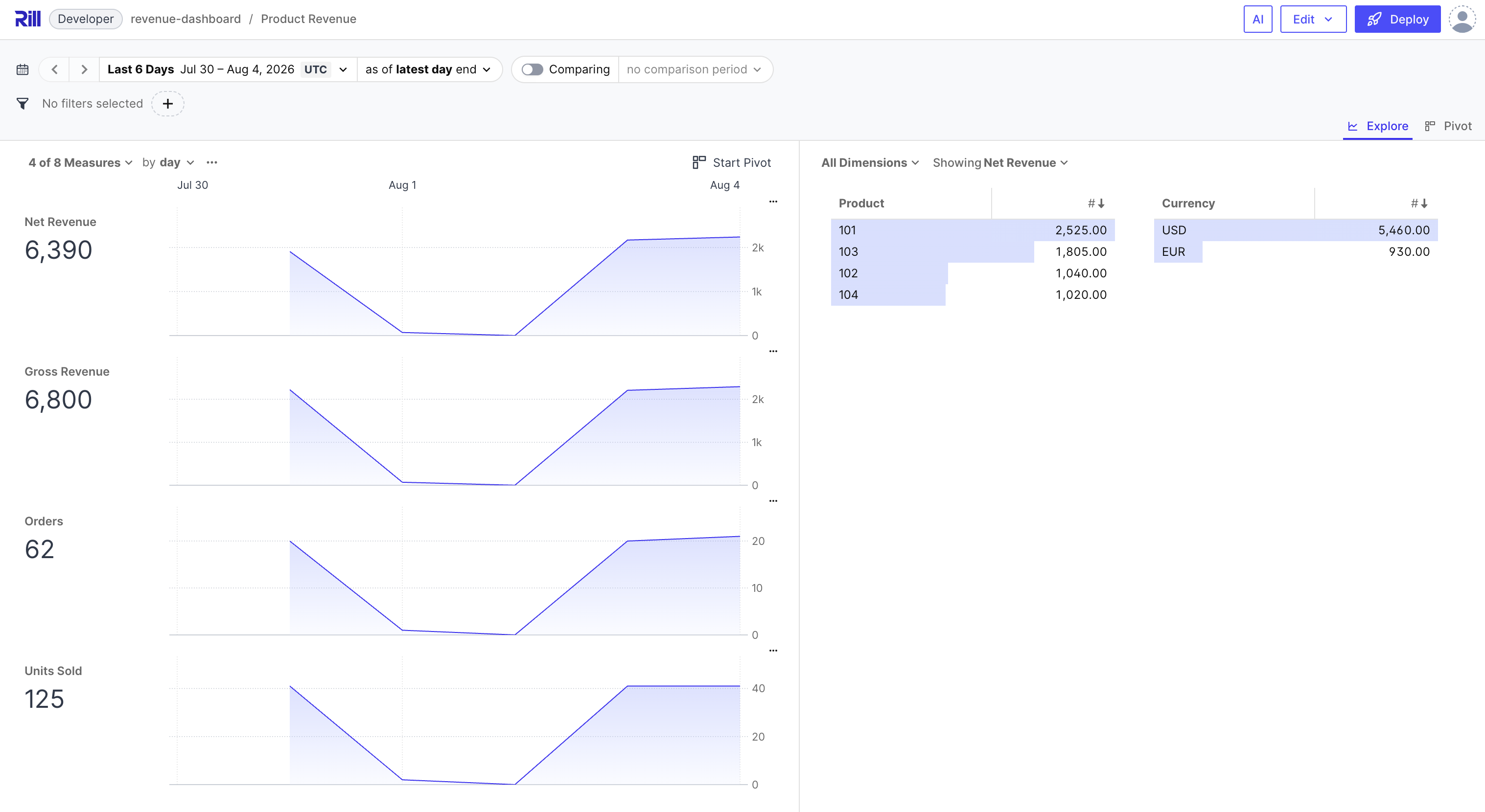
Putting a Dashboard on It
That query answers the question, but only if you write it first. A dashboard turns the same rollup into something you can slice without typing SQL, and Rill is a great tool for that.
Start a project:
rill init revenue-dashboard --olap clickhouse
Point it at the ClickHouse from the compose file above, in
connectors/clickhouse.yaml:
type: connector

driver: clickhouse
host: localhost
# ClickHouse's native protocol, not the HTTP port the sink writes over.
port: 9000
username: default
database: analytics
ssl: false
Then describe the metrics in metrics/product_revenue.yaml:
type: metrics_view

display_name: Product Revenue
model: product_revenue_daily

timeseries: revenue_date
smallest_time_grain: day

dimensions:
  - name: product
    display_name: Product
    expression: toString(product_id)

  - name: currency
    column: currency

measures:
  - name: orders
    expression: SUM(orders_delta)
    format_preset: humanize

  - name: net_revenue
    expression: SUM(net_revenue_delta)
    format_d3: ",.2f"

  - name: avg_order_value
    expression: SUM(net_revenue_delta) / NULLIF(SUM(orders_delta), 0)
    format_d3: ",.2f"
    valid_percent_of_total: false
The complete file is available for download here:
product_revenue.yaml.
It adds the remaining measures - units sold, gross revenue, discounts, refunds
and a refund rate - along with an explore: block that picks the default time
range and the measures the dashboard leads with.
It's important to highlight that every measure is a SUM of a delta.
The usual way to start a metrics view is with a COUNT(*) baseline, which is wrong.
Summing orders_delta instead lets the -1 do its job.
The same reasoning makes the derived measures work properly. avg_order_value divides
one delta sum by another, so a retraction removes both its revenue and its order
from the average, and the refund rate in the full file works the same way. Each
is a ratio rather than something additive, which is what
valid_percent_of_total: false tells Rill - a "percent of total" column would be
meaningless for them. Their divisors reach zero once a key's deltas fully cancel,
hence the NULLIF.
The dimension needs one accommodation. product_id is a UInt64, which Rill
would treat as a number to aggregate rather than an attribute to group by, so
toString() makes it categorical. That forces the rename to product:
ClickHouse-backed dimensions that use an expression may not reuse a column name
from the underlying table.
Launch it:
rill start revenue-dashboard
The dashboard is at localhost:9009, with revenue over time, a breakdown by
product and currency, and drill-down on any of them. Because it queries
ClickHouse live and the pipeline is still running, an UPDATE in Postgres shows
up on a refresh.