Building a Custom Source Plugin: Extracting Events from AWS CloudTrail
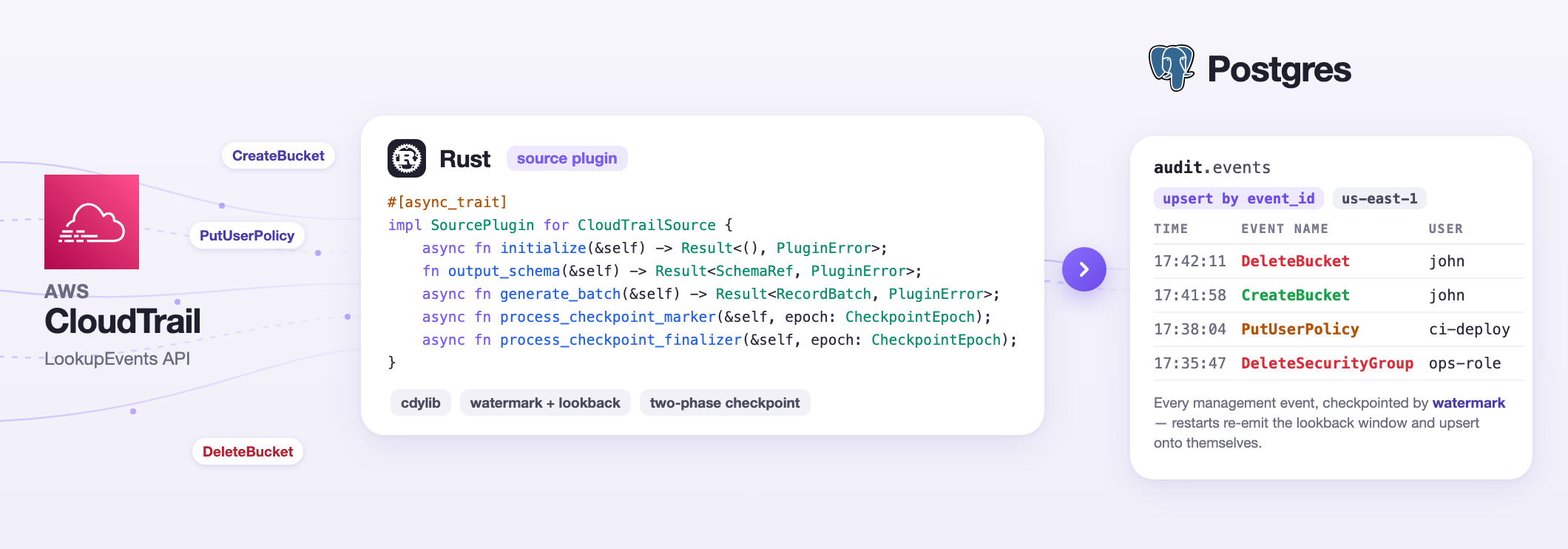
Streamling ships with built-in sources and sinks, but the more interesting promise is that you can add your own: a plugin is a small Rust crate, compiled to a shared library, that Streamling loads at startup. This tutorial walks through what it takes to build a production-ready source plugin, using the CloudTrail source from the community plugins repository as the example. Then we put it to work: the audit history of an AWS account streamed into a Postgres table, with a tiny dashboard on top.
Install Streamling first if you haven't already, it's just a single binary.
Problem
Ingesting data from Apache Kafka or relational databases like Postgres is a mostly solved problem for any data processing tool. But, sometimes, your only data source is an HTTP API. Perhaps an SDK is available to make querying the API a bit easier, but it's still quite challenging to be used as a data source. How do you query a range of data (pagination sounds simple, but it can be really tricky in practice)? How do you persist progress and resume after a failure? Handle retries? Schema evolution?
In this tutorial we'll focus on getting data from AWS CloudTrail. In case you're not familiar with it:
AWS CloudTrail is an AWS service that helps you enable operational and risk auditing, governance, and compliance of your AWS account. Actions taken by a user, role, or an AWS service are recorded as events in CloudTrail. Events include actions taken in the AWS Management Console, AWS Command Line Interface, and AWS SDKs and APIs.
CloudTrail is notoriously difficult to query. The recommended "production" setup involves S3 and SQS, which seems like an overkill for a service that provides auditing events. An API is also available, but it offers some unique challenges:
- Only 90 days of history is available
- Rate limiting: max 2 requests per second (per account per region)
- Can't use a "durable cursor" to fetch data: you can't just say "give me everything since token X" across calls
Many APIs out there are easier to work with, so even though querying CloudTrail is somewhat challenging, it's a great opportunity to learn how to build a custom source in Streamling.
We can also use this opportunity to build a service that's geniunely useful to any company with an AWS account. Sooner or later every team using AWS asks some version of who did that. Who deleted the security group? When did that IAM policy change? What has this access key been doing since Tuesday?
We'll get the data out of CloutTrail, save it in Postgres and build a dashboard. In the first half of this tutorial we'll build the source plugin; after that we'll continue with an end-to-end pipeline.
A Plugin Is a Shared Library
Streamling plugins are Rust crates compiled as a cdylib. At startup, Streamling
loads the library from the STREAMLING__PLUGIN__PATH environment variable (a
file, or a directory of them), asks it which plugins it contains, and from then
a plugin source is configured in the pipeline YAML like any built-in one -
its registered id becomes the type.
The FFI boundary between the host and the plugin is handled by abi_stable, but you never touch it: a pair of macros generates the whole layer. A new plugin crate starts like this:
[package]
name = "my_plugins"
version = "0.1.0"
edition = "2024"

[lib]
crate-type = ["cdylib", "rlib"]

[dependencies]
streamling-plugin = "0.2.1"
abi_stable = "0.11.3"  # required by the init macro

arrow = "58.3.0"
arrow-schema = "58.3.0"
async-trait = "0.1"
tokio = { version = "1", features = ["rt-multi-thread", "macros", "sync"] }
tracing = "0.1"
cdylib is the loadable library; rlib is there so unit tests still work. The
CloudTrail source additionally pulls in the AWS SDK crates, chrono and
serde_json - see the community repo's
Cargo.toml
for the exact feature flags, which matter when several TLS-using crates share
one library.
And lib.rs is just registration:
mod cloudtrail;

use crate::cloudtrail::CloudTrailSource;
use streamling_plugin::{init_plugin_with_async_runtime, register_plugin_source};

register_plugin_source!("cloudtrail_source", CloudTrailSource);
init_plugin_with_async_runtime!();
register_plugin_source! maps the id to your type; you can register as many
sources, transforms and sinks as you like, and the init macro - which must come
last - generates the FFI module for all of them.
There are two init macros. init_plugin! hands your code the host's async
runtime, proxied across the FFI boundary. init_plugin_with_async_runtime!
instead starts a real Tokio runtime inside the plugin library. The AWS SDK (like
most non-trivial async crates) expects a real Tokio reactor to exist, so we need
the latter.
The plugin_examples directory in the Streamling repository has a minimal end-to-end crate with this exact shape; it's a good thing to copy when starting from zero.
The Source Contract
A source implements two traits:
impl CloudTrailSource {
    pub fn new(
        _rt: PluginAsyncRuntimeObj,
        state_backend_factory: PluginStateBackendFactory,
        metrics_recorder: PluginMetricsRecorder,
        options: HashMap<String, String>,
    ) -> Result<Self, PluginInitializationError> {
        // parse and validate options - fail here if needed
    }
}

#[async_trait]
impl SupportsGracefulShutdown for CloudTrailSource {
    fn is_running(&self) -> bool { /* define an AtomicBool */ }
    async fn terminate(&self) -> Result<(), PluginError> { /* flip it, stop background work */ }
}

#[async_trait]
impl SourcePlugin for CloudTrailSource {
    async fn initialize(&self) -> Result<(), PluginError> { /* open clients, spawn background work */ }
    fn output_schema(&self) -> Result<SchemaRef, PluginError> { /* a fixed Arrow schema */ }
    async fn generate_batch(&self) -> Result<RecordBatch, PluginError> { /* the next batch, or empty */ }
    async fn process_checkpoint_marker(&self, epoch: CheckpointEpoch) -> Result<(), PluginError>;
    async fn process_checkpoint_finalizer(&self, epoch: CheckpointEpoch) -> Result<(), PluginError>;
    fn labels(&self) -> Vec<PluginLabel> { /* optional - this source tags its metrics with the region */ }
}
The lifecycle around it matters more than the signatures:
newruns when the pipeline is parsed. It receives theoptions:map from the YAML. Anything invalid should be rejected here - a config error at startup beats a background loop that can never succeed.initializeruns once, before the first batch, and is the only place to open network resources. It's not guaranteed to run at all: validation-only runs terminate the plugin without initializing it.generate_batchis called in a loop for as long asis_running()returns true. Returning an empty batch means "nothing right now". If you return an error, the host logs it and calls again - errors don't propagate, so the source owns its own retry semantics.process_checkpoint_markerandprocess_checkpoint_finalizerare the two-phase checkpoint protocol; more on them later.- The output must contain a non-nullable
_gs_opstring column (STREAMLING_COLUMN_NAME_OP) that tags each row as an insert, update or delete. That's the same convention the Postgres CDC tutorial leaned on from the consuming side.
Designing Around LookupEvents
Before writing any of those methods, it's worth being honest about the API we're wrapping, because every design decision in the source falls out of its constraints:
- There is no durable cursor. LookupEvents takes a time range and returns pages, newest first. Page tokens exist within one query, but there is no "give me everything since token X" across calls.
- Events arrive late. CloudTrail delivers events with a lag - typically a few minutes, up to about fifteen. An event with a 12:00 timestamp might not be queryable until 12:15.
- The API is slow by design. 2 requests per second per account and region, shared with the console's Event history page, at 50 events per page.
- It only holds management events, for 90 days, and one region per call.
So we can design the source as a poller built around time watermarks. The poller keeps a greedy fetch watermark that only plans API windows: each cycle re-scans a window that starts a configurable lookback behind it (to catch late-delivered events), dedupes what it has already emitted, and pushes the rest downstream. A separate delivered watermark - the newest event time actually handed to the host - is the one that gets checkpointed, so a restart resumes from what was truly delivered, not from what was merely fetched.
Polling Without a Cursor
The poller is a background Tokio task, spawned in initialize, that talks to
CloudTrail and feeds a bounded channel. Its core is a pure function that plans
the next window:
pub(crate) fn plan_window(
    watermark_ms: i64,
    floor_ms: i64,
    lookback_ms: i64,
    max_window_ms: i64,
    now_ms: i64,
) -> Window {
    let start_ms = watermark_ms
        .saturating_sub(lookback_ms)
        .max(floor_ms)
        .max(0);
    let end_ms = start_ms.saturating_add(max_window_ms);
    Window {
        start_ms,
        end_ms: (end_ms < now_ms).then_some(end_ms),
    }
}
 past ──────────────────────────────────────────────────────► now
              │◄––– lookback –––►│
      ────────┼──────────────────┼──────────────────┤
         window start        watermark          window end
                                          (start + max_window; omitted
                                           once it reaches "now")
A few things hiding in those ten lines:
- The window starts
lookbackbehind the watermark. That overlap is the late-event protection: recent history is re-fetched every cycle, because an event may only become visible minutes after its timestamp. - The window end is capped at
start + max_windowduring backfills, which bounds how much one cycle can buffer. But once the cap would pass "now", the request omits its end time entirely - so clock skew between you and AWS can never cut off fresh events. - A capped window means we're behind: the poller loops again immediately.
An uncapped window means we're caught up: it sleeps
poll_interval_secs. - After a fully-scanned capped window, a sibling pure function
(
advance_watermark) moves the fetch watermark to the window's end even if the window came back empty - otherwise a backfill would never progress through a quiet stretch of history.
Re-fetching an overlap means seeing the same events again, so the poller keeps a dedup set of emitted event ids. It doesn't grow forever: each entry carries its event time, and ids older than the current window start are evicted - safe because window starts never move backwards. And because the API is paginated with no snapshot isolation, nothing from a window is committed to the dedup set until the whole window has been fetched successfully; a partial fetch is dropped and re-planned, and marking its events as seen would turn that retry into data loss.
One more subtlety before the events leave the poller:
records.sort_by_key(|record| record.event_time_ms);
LookupEvents returns newest-first, but the source delivers oldest-first. This is important: the checkpoint logic ahead assumes "max delivered event time" is a true low-watermark for everything still in flight, and that's only true if delivery order is ascending.
The poller also self-throttles to one request per second - half the documented budget, leaving the other half for whoever is using the console - and treats a failed cycle as "back off, re-plan the same window", so an API error never skips data.
Declaring the Output Schema
A source declares its schema once, up front. The CloudTrail source emits an
Athena-style layout: scalar fields become typed columns, and nested subtrees
(userIdentity, requestParameters, ...) are re-serialized as compact JSON
strings:
let utf8 = |name: &str| Field::new(name, DataType::Utf8, true);
let boolean = |name: &str| Field::new(name, DataType::Boolean, true);
Schema::new(vec![
    Field::new(STREAMLING_COLUMN_NAME_OP, DataType::Utf8, false), // _gs_op
    Field::new("event_id", DataType::Utf8, false),
    Field::new(
        "event_time",
        DataType::Timestamp(TimeUnit::Millisecond, Some("UTC".into())),
        false,
    ),
    utf8("event_name"),
    utf8("event_source"),
    utf8("aws_region"),
    utf8("source_ip_address"),
    boolean("read_only"),
    utf8("error_code"),
    utf8("error_message"),
    utf8("username"),
    // ... 12 more scalar columns ...
    utf8("user_identity"),      // nested subtrees, re-serialized
    utf8("request_parameters"), // as compact JSON strings
    utf8("response_elements"),
    utf8("resources"),
    // ... and 6 more JSON columns - 33 in total
])
Why strings for the nested parts? CloudTrail's payload shape varies wildly
across the several hundred AWS services that write to it - requestParameters
for S3 looks nothing like the one for IAM. A typed schema would either explode
into thousands of columns or silently drop fields. A JSON string column is
stable, and Postgres can handle it at query time with ::jsonb.
Two conventions to note. Audit events are immutable facts, so every row is
emitted with _gs_op = 'i' - this source never produces updates or deletes.
And event_id, CloudTrail's own UUID for each event, becomes the natural
primary key that lets everything downstream deduplicate.
Validating Options
The options: map arrives as plain strings. The community plugins repo has a
small PluginOptions
helper worth copying: every option can also be supplied as an environment
variable (STREAMLING__PLUGIN__CLOUDTRAIL_SOURCE__<KEY>), which wins over the
YAML value - the natural home for credentials.
Validation belongs in new, and it should catch mistakes that would otherwise
fail silently. The best example in this source: static credentials must be
both-or-neither, because the AWS SDK would happily treat a lone
access_key_id as "no static credentials" and fall back to the default chain -
possibly incorrectly:
let has_access_key = optional(opts, "access_key_id").is_some();
let has_secret_key = optional(opts, "secret_access_key").is_some();
if has_access_key != has_secret_key {
    return Err(PluginError::Internal(
        "cloudtrail_source: access_key_id and secret_access_key must be set \
         together (omit both to use the default AWS credential chain)"
            .to_string(),
    ));
}
The same section rejects a max_window_secs that doesn't exceed
lookback_secs - each poll window starts lookback behind the watermark, so if
the window can't outspan the lookback, the watermark can never move forward.
Wiring It Together
initialize builds the SDK client and then does something worth stealing -
it probes the API before declaring itself ready:
// Probe so bad credentials/region fail initialization instead
// of WARN-looping forever in the background poller.
client
    .lookup_events()
    .max_results(1)
    .send()
    .await
    .map_err(|e| {
        PluginError::Internal(format!(
            "cloudtrail_source: LookupEvents probe failed: {}",
            DisplayErrorContext(&e)
        ))
    })?;
Without the probe, a typo'd region or expired credentials would surface as an endless stream of warnings from a background task. With it, the pipeline fails at startup with the actual AWS error.
Then it reads the checkpoint from the state backend Streamling hands every
plugin (self.state.get()), resolves where to start - a restored checkpoint
always wins over the configured start_time - and spawns the poller.
generate_batch drains the channel. The interesting part is what it doesn't
do (metrics calls trimmed):
async fn generate_batch(&self) -> Result<RecordBatch, PluginError> {
    let inner = self.inner()?;
    if !self.is_running() {
        return Ok(RecordBatch::new_empty(self.converter.schema()));
    }

    let mut recv = inner.recv.lock().await;

    // The host only asks for a new batch after delivering the previous
    // one, so its watermark may become checkpoint-visible now.
    if let Some(delivered) = recv.pending_watermark.take() {
        inner.delivered_watermark.fetch_max(delivered, Ordering::SeqCst);
    }

    recv.fill(self.config.batch_size, BATCH_WAIT).await;
    let take = recv.carry.len().min(self.config.batch_size);
    if take == 0 {
        return Ok(RecordBatch::new_empty(self.converter.schema()));
    }

    // On error the carry is left intact, so the next call retries the
    // exact same records.
    let (batch, max_event_time) = {
        let rows = &recv.carry.make_contiguous()[..take];
        let batch = self.converter.convert(rows)?;
        (batch, rows.iter().map(|row| row.event_time_ms).max())
    };
    recv.carry.drain(..take);
    recv.pending_watermark = max_event_time;
    Ok(batch)
}
Two deliberate delays are doing the correctness work here. Records leave the
carry buffer only after a batch containing them has been built, so an errored
call retries the exact same records. And the batch's max event time is not
applied to the checkpointable watermark immediately - it's parked in
pending_watermark until the next call. The host delivers a batch downstream
before asking for another, but a checkpoint marker can arrive while a batch is
still queued; advancing the watermark early would let that checkpoint record
progress past an undelivered batch, which turns "duplicates after restart" into
"data loss after restart".
Backpressure comes for free: the channel between poller and generate_batch
holds at most 16 batches, and a full channel stops the poller from fetching
more. A slow sink propagates all the way back to how fast we call AWS.
Checkpointing
Streamling checkpoints in two phases. A marker flows through the pipeline to ask every node "what would you save?"; once the checkpoint is complete, a finalizer tells them to actually save it:
async fn process_checkpoint_marker(&self, epoch: CheckpointEpoch) -> Result<(), PluginError> {
    let inner = self.inner()?;
    let watermark = inner.delivered_watermark.load(Ordering::SeqCst);
    inner.pending_epochs.lock().await.insert(epoch.0, watermark);
    Ok(())
}

async fn process_checkpoint_finalizer(&self, epoch: CheckpointEpoch) -> Result<(), PluginError> {
    let inner = self.inner()?;
    let Some(watermark) = inner.pending_epochs.lock().await.remove(&epoch.0) else {
        return Ok(());
    };
    self.state.put(watermark).await.map_err(PluginError::State)?;
    Ok(())
}
The marker snapshots the watermark for that epoch; the finalizer persists the snapshot. Keeping them separate matters because batches keep flowing between the two - persisting the live watermark at finalize time would checkpoint progress the rest of the pipeline hasn't confirmed yet.
self.state is a PluginStateBackend<i64> - a tiny typed key-value store the
host provides, which persists into whatever state backend the pipeline runs
with. Locally that's a SQLite file (./state.db) created automatically, so
checkpoint-and-resume works with zero setup.
Add it all up and the delivery guarantee is at-least-once: a restart resumes at the checkpointed watermark minus the lookback, so the lookback window is re-emitted.
Building and Testing
cargo build --release --lib
The artifact lands in target/release/ as libmy_plugins.so
(libmy_plugins.dylib on macOS, my_plugins.dll on Windows). If you're building
the community plugins project, expect to see libcommunity_plugins.so
(or libcommunity_plugins.dylib / community_plugins.dll accordingly).
Notice how much of the source ended up as pure functions - plan_window,
advance_watermark, the dedup set, the sort-and-chunk step, the JSON-to-record
conversion. That's deliberate: all the windowing edge cases (does an empty
backfill window still advance? does the lookback reach before the configured
start?) are plain unit tests without any AWS mocks.
A proper end-to-end test can be added to validate the behavior by actually running Streamling against a CloudTrail endpoint (a real one or emulated).
Putting Everything Together
On the AWS side, the only requirement is one IAM permission:
{
  "Version": "2012-10-17",
  "Statement": [
    {
      "Effect": "Allow",
      "Action": "cloudtrail:LookupEvents",
      "Resource": "*"
    }
  ]
}
Credentials come from the default AWS chain (aws configure, SSO, instance
roles - whatever you already use).
Build your own crate or use Streamling community plugins and link it like this:
export STREAMLING__PLUGIN__PATH=./libcommunity_plugins.so
The whole pipeline fits in a page. It's available for download here: aws-audit-pipeline.yaml:
sources:
  aws_audit:
    type: cloudtrail_source
    primary_key: event_id
    options:
      region: us-east-1
      # Where to start: any point within LookupEvents' 90-day retention.
      start_time: "2026-07-27T00:00:00Z"
      # Management events are dominated by reads; keep only mutating calls.
      lookup_attribute_key: ReadOnly
      lookup_attribute_value: "false"

transforms: {}

sinks:
  postgres.audit_events:
    type: postgres
    from: aws_audit
    schema: audit
    table: events
    primary_key: event_id
A few notes:
regionshould be a region you actually work in. One source covers one region - run several sources for multi-region coverage.us-east-1is a good default because global services (IAM, STS, console sign-in) record their events there.start_timeaccepts an RFC 3339 timestamp like the one above (backfill from that point, then keep tailing) ornow(only new events). Pick a start a couple of weeks back: the backfill walks forward through history at the API's throttled pace, so the further back you start, the longer it takes to catch up to live. But with checkpointing you only ever backfill once.- The
ReadOnly = "false"filter is applied server-side by CloudTrail, which cuts easily 90% of the volume before it ever reaches you. The trade-off: denied read attempts (someone probingListSecrets) won't be captured, only denied writes. Drop the filter if that recon visibility matters to you. primary_key: event_idis what turns at-least-once delivery into effectively-exactly-once: the Postgres sink upserts, so re-emitted events land on themselves.
For Postgres, a minimal compose file:
services:
  postgres:
    image: postgres:16
    ports: ["5432:5432"]
    environment:
      POSTGRES_USER: postgres
      POSTGRES_PASSWORD: postgres
      POSTGRES_DB: aws
The Postgres sink takes its connection settings from the environment rather than the pipeline file:
export STREAMLING__POSTGRES_SINK__HOST=localhost
export STREAMLING__POSTGRES_SINK__USER=postgres
export STREAMLING__POSTGRES_SINK__PASS=postgres
export STREAMLING__POSTGRES_SINK__DB=aws
Start it with streamling aws-audit-pipeline.yaml. No DDL needed: the sink creates the
audit schema and the events table from the source's Arrow schema - the 33
columns minus _gs_op, which the sink consumes to route rows and never stores.
event_time becomes a TIMESTAMP column (values are UTC), the two boolean
flags become BOOLEAN, everything else TEXT.
The backfill starts at your start_time and walks forward; within a minute or
two rows are landing:
SELECT event_time, event_name, event_source, username, source_ip_address
FROM audit.events
ORDER BY event_time DESC
LIMIT 10;
Watching It In Action
Make some noise in your account, in the region the pipeline watches:
BUCKET=streamling-audit-demo-$RANDOM
aws s3 mb s3://$BUCKET --region us-east-1
aws s3 rb s3://$BUCKET --region us-east-1
Now wait - this is normal delivery lag in CloudTrail, typically a few minutes and up to about fifteen. Then:
SELECT event_time, event_name, username,
       request_parameters::jsonb ->> 'bucketName' AS bucket
FROM audit.events
WHERE event_source = 's3.amazonaws.com'
ORDER BY event_time DESC
LIMIT 5;
event_time           event_name    username  bucket
2026-08-10 17:42:11  DeleteBucket  john      streamling-audit-demo-22841
2026-08-10 17:41:58  CreateBucket  john      streamling-audit-demo-22841
That ::jsonb is the schema decision paying off: bucketName was never a
column, but it was never lost either.
Try restarting as well! Kill the pipeline with Ctrl-C mid-backfill and start
it again: it resumes from the checkpointed watermark in ./state.db rather
than from start_time. The lookback window gets re-emitted - that's the
documented at-least-once behavior - and every re-emitted row upserts onto
itself by event_id, so the table never sees a duplicate.
Putting a Dashboard on It
A table you can query is already a win, but the point of an audit log is that the next person doesn't have to remember the SQL. A single-file web server is enough for that. Download server.mjs, then - one dependency, no build step:
npm install pg
node server.mjs
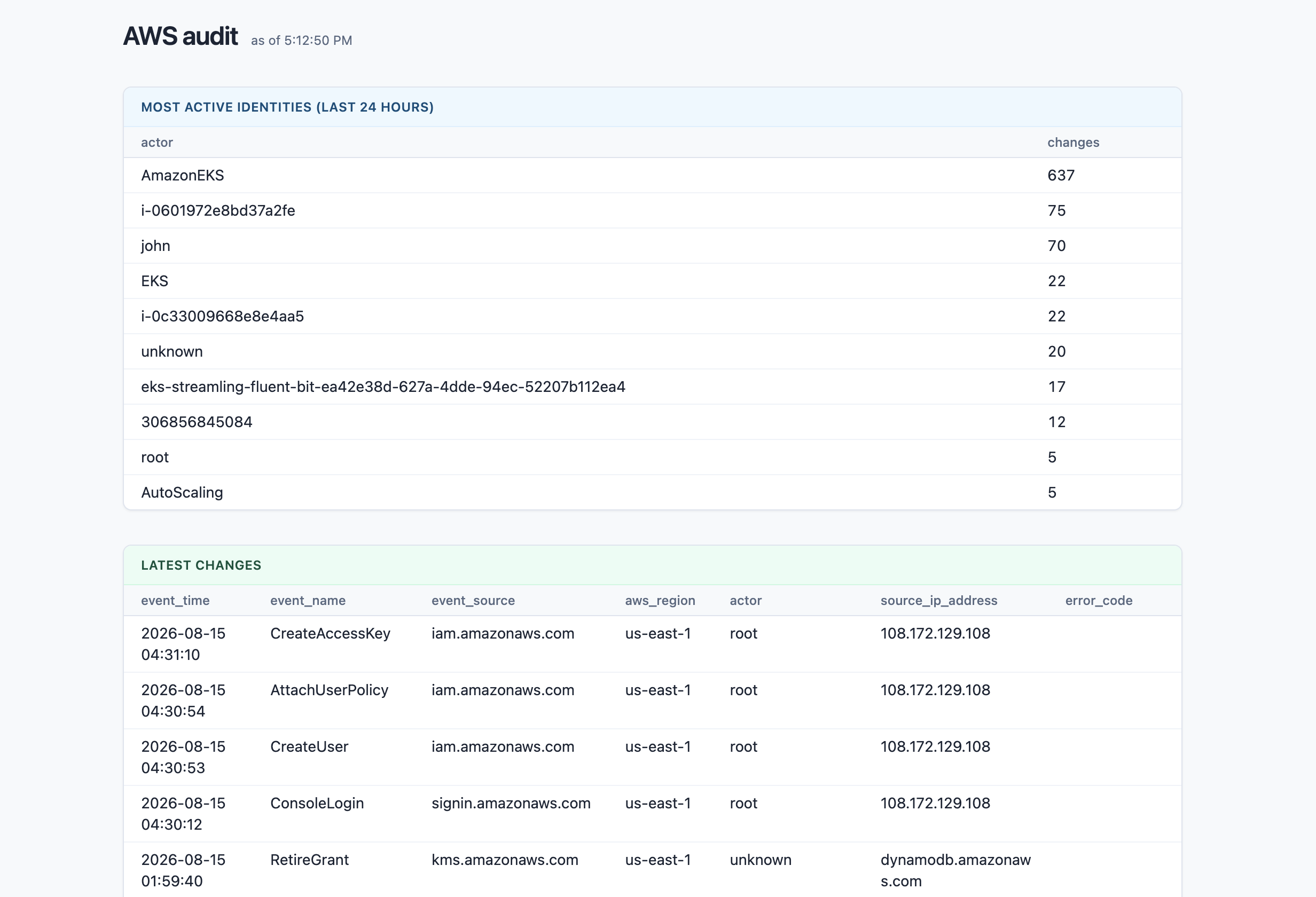
It serves one HTML page with three panels backed by three queries: most active identities in the last 24 hours, the latest changes, and recent errors. The only query worth showing here is the identity one:
SELECT COALESCE(username, user_identity::jsonb ->> 'arn', 'unknown') AS actor,
       count(*) AS changes
FROM audit.events
WHERE event_time > now() AT TIME ZONE 'utc' - interval '24 hours'
GROUP BY 1
ORDER BY changes DESC
LIMIT 10;
CloudTrail only fills username for IAM users; role sessions, service calls
and federated identities leave it null, but every event carries a
userIdentity subtree - so the JSON column steps in as the fallback. The
errors panel needs no filter cleverness at all: error_code IS NOT NULL on an
audit table surfaces every denied change in the account.
Because the pipeline keeps tailing LookupEvents and the page re-queries every 30 seconds, the dashboard is live: the next IAM change in your account shows up a few minutes after it happens.
The pattern this source implements - poll a cursor-less HTTP API with a time watermark, re-scan a lookback window, dedupe by id, checkpoint the watermark - transfers directly to a whole family of APIs: audit logs from GitHub or Okta, Stripe events, anything that offers "give me records between two timestamps". And if you build a source (or sink) others could use, the community plugins repository takes contributions - that's where this one lives.
Open localhost:8080 and poke around: